
On-Page SEO Checklist for Higher Rankings
Looking to improve your website’s ranking in Google? On-page SEO is one of the key factors that influence the visibility of a website in search results. It refers to optimizing the content and structure of your web pages to make it easier for search engines to understand and for users to navigate.
In short, on-page SEO practices focus on page titles, headings, URL, images, keywords, and content. Although the optimization of these 6 aspects of web pages can sometimes be a small detail, they collectively have a significant impact on the performance of your site.
However, when most people are talking about on-page SEO, they often mean keyword research, placement, and density. While keywords are essential elements of SEO, one should not focus too much on them, as it may result in low-quality and unhelpful content.
Below, you will find a comprehensive list of on-page SEO optimization tactics to help you drive traffic to your website, attract the right audience, and increase conversions.
What Is On-Page SEO?
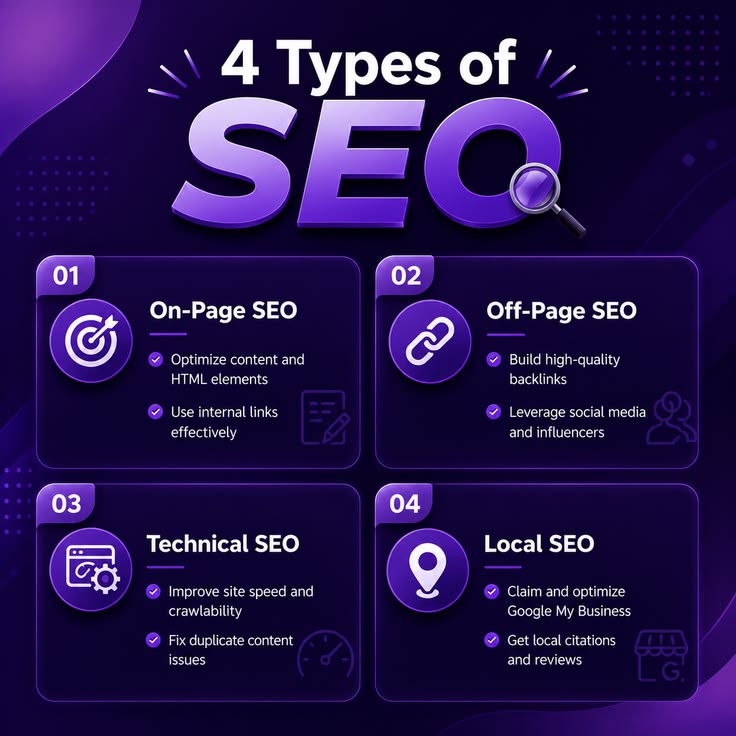
On-page SEO refers to the process of optimizing the website and its pages to help rank higher on the search engine results pages (SERPs) and offer a better experience to the users. It is one of the main areas of SEO that involve on-site elements such as content, title tags, headings, images, internal links, and URL.
For instance, optimizing an article about digital marketing will be achieved by including relevant keywords, using informative headings, and adding links to related content and web pages.
At the same time, on-page SEO should also be optimized for users and not just search engines.
Why Is On-Page SEO Important?
On-page SEO plays an important role in helping your website perform better in search results. Here are some key benefits:
- Improves search visibility: Well-optimized pages can help search engines understand your content and identify relevant searches.
- Attracts relevant traffic: Using appropriate keywords helps connect your pages with people searching for related information.
- Enhances user experience: Clear headings, readable content, and useful links make your website easier to explore.
- Supports content quality: On-page optimization encourages you to create organized, helpful, and relevant content.
- Helps search engines understand your pages: Proper titles, headings, and descriptive links provide useful context.
Remember, on-page SEO can support higher rankings, but no checklist can guarantee a particular position on Google.
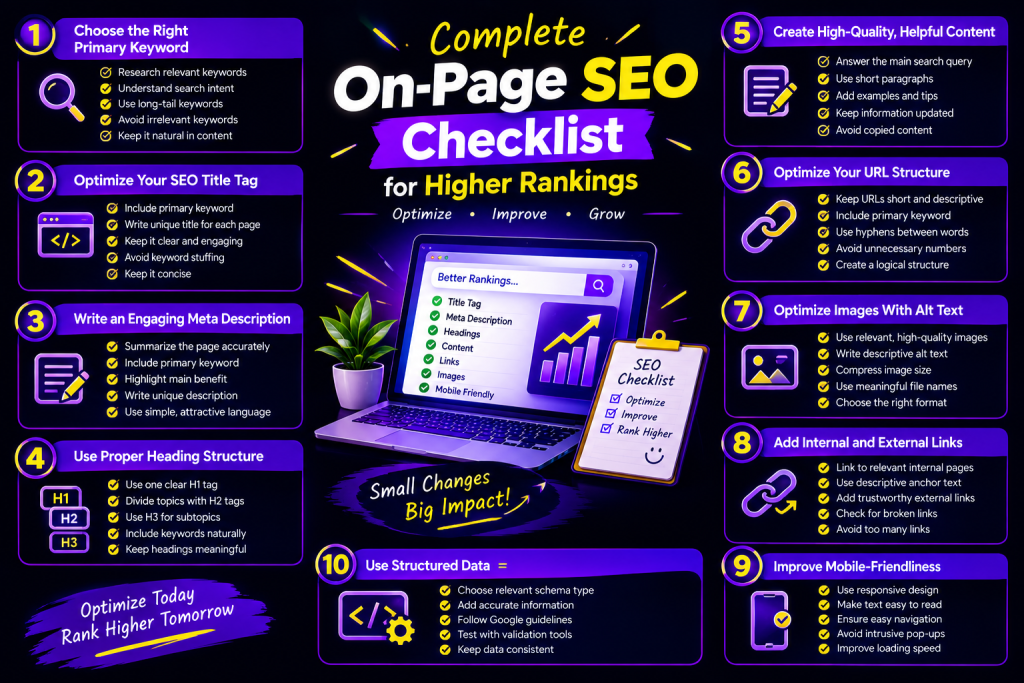
Complete On-Page SEO Checklist for Higher Rankings
These are the critical SEO on-page optimization tips that will drive sustainable traffic to your site.
H3: 1. Pick the Right Primary Keyword
When optimizing your web pages, pick the primary keyword that best matches a topic your page is about and what your target audience is searching for. Do keyword research and try to address the user intent behind keyword queries.
Checklist:
Pick one primary keyword to optimize your page
Find secondary keywords related to your primary keyword
Address the user’s intent
Do not stuff keywords
Use keywords in your content regularly
H3: 2. Optimize Website Title Tag
A title tag is an HTML element that describes the content on a web page. It appears on the SERPs next to the URL, so it must be optimized to increase the likelihood of attracting a click from a prospect.
Checklist:
Stuff the primary keyword
Make the title unique and attractive for each page
Make the title readable and not stuffed with keywords
H3: 3. Write an SEO-Friendly Meta Description
A meta description is an HTML element that summarizes the content on a web page. It appears underneath the headline in the SERPs. The meta description is a great place to market your page by summarizing its benefits and encouraging the prospect to visit your page.
Checklist:
Write a description that summarizes the page’s contents
Add the primary keyword
Appeal to the user’s intent
Make the description unique for each page
Write it in an attractive way
Google may alter the snippet that appears in the SERPs, so it may differ from the description you wrote.
H3: 4. Optimize Headings
Multiple heading tags help organize the written content on your page. Moreover, they tell the search engines what the contents of your page are about and what keywords you have included.
Checklist:
Use one primary heading (H1)
Break up the written content into sections and subsections using H2 and H3
Optimize the headings by including relevant keywords
Make the headings descriptive and easy to read
H3: 5. Write High-Quality and Useful Content
High-quality content is essential for any SEO strategy. Your texts need to be written in such a way that they answer the user’s questions fully or at least partially. It means that your content should not be keyword-stuffed but rather contain significant volumes of relevant information. To optimize your content, you may use keyword-rich phrases several times per paragraph.
Checklist:
Answer the user’s questions fully
Write the paragraphs in a way that anyone can understand
Include additional tips and information
Avoid using copied or keyword-stuffed content
Make sure your content does not have irrelevant information
Make sure your article is up-to-date and does not have any broken links
Write enough content to fully cover the topic
H3: 6. Optimize the Web Address or URL
A web address or URL is a unique identifier of a web page. Your prospects will see the URL, so it is necessary to optimize the addresses of your web pages.
Checklist:
Make sure URLs are easy to read and concise
Add the main keyword if relevant
Use hyphens to separate words in the URL
Avoid using unnecessary numbers and special characters
Make sure URLs follow a specific pattern
Avoid using random letters and numbers
Examples:
Example.net/on-page-seo-checklist (recommended)
Example.net/page?id=98765
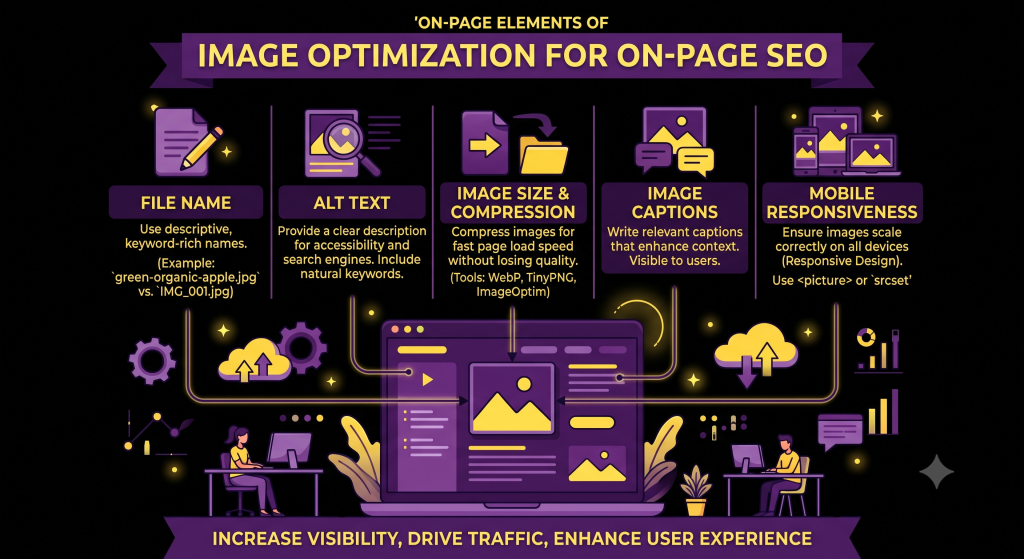
H3: 7. Optimize Photos and Graphics
Photos and graphics play an essential role in any online content. They make the page easier to read and visually appealing. However, images should also be optimized.
Checklist:
Use relevant and high-quality images
Write descriptive alt text
Make sure images are compressed and do not have a larger size than necessary
Use descriptive file names with keywords
Specify the image format (JPG, PNG, WEBP)
Add Internal and External Links
Links help visitors discover more information and give search engines useful context about your content.
Checklist:
- Link to relevant pages on your website.
- Use descriptive anchor text.
- Link to trustworthy external sources when useful.
- Check for broken links.
- Avoid adding too many unnecessary links.
Internal links can also help search engines discover and understand other pages on your website.
Improve Mobile-Friendliness and Page Experience
Many visitors browse websites on mobile devices. Your pages should be easy to use on different screen sizes and load efficiently.
Checklist:
- Use a responsive website design.
- Make text easy to read on mobile.
- Ensure buttons and links are easy to tap.
- Avoid intrusive pop-ups.
- Improve loading performance.
- Check your website’s Core Web Vitals.
H3: 10. Use Structured Data Where Relevant
Structured data is code that helps search engines understand specific information on your page. Depending on the content, it may make your pages eligible for certain rich search appearances.
Checklist:
- Choose a suitable structured data type.
- Add accurate information.
- Follow Google’s structured data guidelines.
- Test your markup with available validation tools.
- Keep structured data consistent with visible page content.
Structured data does not guarantee rich results or higher rankings.
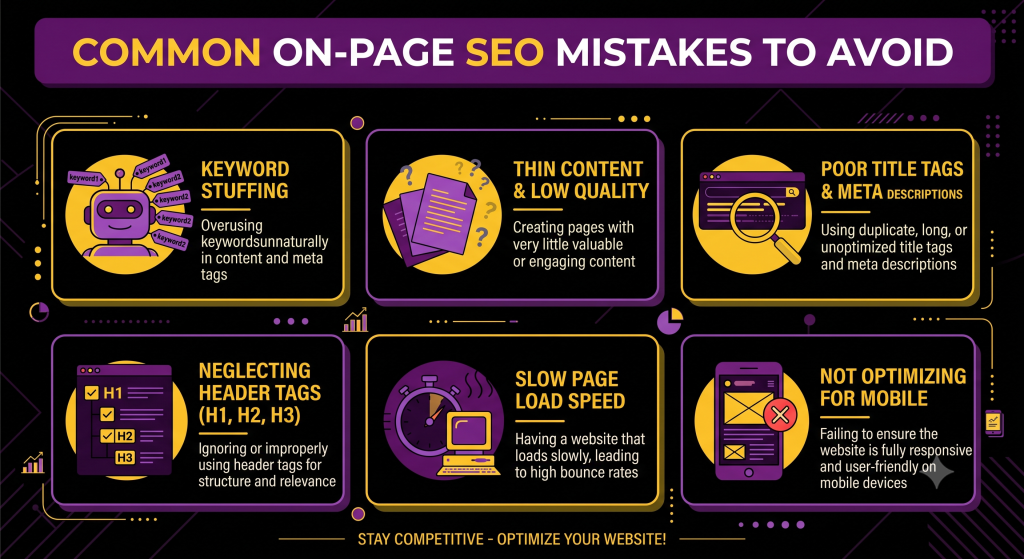
Common On-Page SEO Mistakes to Avoid
Even after completing an SEO checklist, many common mistakes tend to occur. Here are some of the most common mistakes that could damage a website’s SEO.
Keyword stuffing is when someone stuffs keywords into an article. This practice makes the text hard to read.
Duplicate title tags are the same or very similar title tags for different pages on the same site.
Not catering to search intent could turn off many potential customers by providing them with information that doesn’t answer their question.
No image alt text means that any important images on the site aren’t accessible to people with disabilities.
Broken internal links could frustrate users of the website, prompting them to leave the site.
Lastly, neglecting mobile users could cause the site to lose potential sales due to the poor mobile experience.
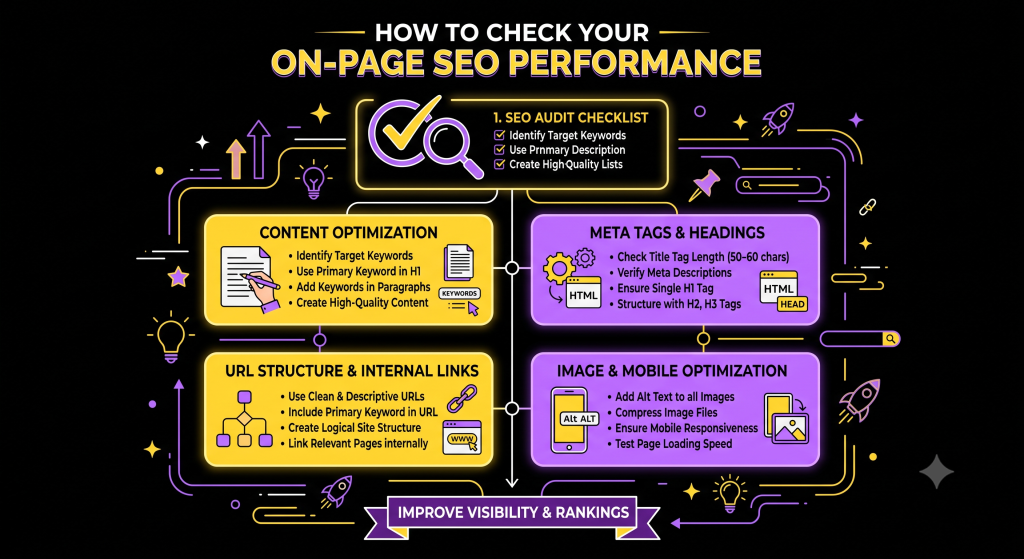
How to Check Your On-Page SEO Performance
After optimizing your pages, monitor their performance to understand what is working.
- Google Search Console: Check search queries, impressions, clicks, and indexing issues.
- Google Analytics: Understand how visitors interact with your website.
- PageSpeed Insights: Review page performance and Core Web Vitals information.
- SEO audit tools: Identify technical and on-page issues that need attention.
Use these insights to update content, improve page experience, and find new optimization opportunities.
Frequently Asked Questions (FAQs)
H3: 1. What is an on-page SEO checklist?
An on-page SEO checklist is a list of important tasks used to optimize individual website pages. It includes keyword research, title tags, meta descriptions, headings, content quality, images, URLs, and internal links.
H3: 2. How often should I update my on-page SEO?
Review your important pages regularly, especially when information becomes outdated, search intent changes, or performance declines. Update content when you can make it more accurate and useful.
H3: 3. Is on-page SEO important for higher Google rankings?
Yes. On-page SEO helps search engines understand your content and helps visitors find useful information. It is an important part of SEO, although rankings also depend on other factors.
H3: 4. What are the most important on-page SEO factors?
Some important factors include helpful content, relevant keywords, descriptive title tags, clear headings, internal links, mobile usability, and a good page experience.
H3: 5. Can I do on-page SEO without paid tools?
Yes. You can start with free tools such as Google Search Console, Google Analytics, PageSpeed Insights, and Google’s structured data testing resources. Paid tools can provide additional research and auditing features.
Conclusion
On-page SEO plays an important role in the success of any website. Choosing the right keywords, optimizing content, images, and internal links are just a few examples of optimizing activities that should be done. Every single optimization task contributes to a website’s overall performance.
Use this ultimate on-page SEO checklist while publishing a blog post or editing a web page. Keep in mind that with time, and proper optimization, your website will begin to grow and attract more and more traffic.

Ready to improve your website’s search visibility?
At DiginovaHub, we help businesses grow online with smart SEO strategies, quality content, and effective digital marketing solutions. Connect with us and take the next step toward stronger online growth.
Connect. Engage. Convert. Grow. — DiginovaHub